
Monitoring what ChatGPT says about your brand is becoming as important as tracking search results. As of July 21 2025, TechCrunch reported that the generative AI assistant processes over 2.5 billion queries per day and often recommends products by name rather than listing links.
Large language models (LLMs) are AI models designed to understand and generate human‑like text using deep learning and neural networks; they contain billions of parameters, are trained on huge text datasets and can perform tasks such as translation or question answering. Unlike traditional search engines, these models do not provide analytics dashboards: there is no way to query their training database, and much of their knowledge comes from opaque internal weights. Because of this, marketers must use a mix of tools and techniques to see when and how the model mentions them.
A brand mention is an appearance of your company or product name in a ChatGPT answer. Citations include clickable links but are far less frequent; research shows ChatGPT cites sources about three times less often than it names brands. Monitoring both mentions and citations helps you understand your visibility, identify misinformation and uncover opportunities to influence AI answers.
How to monitor real-time brand mentions in ChatGPT?
Monitoring real‑time brand mentions in ChatGPT boils down to three tactics.
First, use purpose‑built LLM visibility tools to automatically send a set of prompts to ChatGPT and other models, detect your brand or competitor names and track metrics such as inclusion rate, citation coverage and sentiment.
Second, analyse your server logs to see when AI user bots (for example ChatGPT‑User) crawl your pages, which indicates that the model retrieved your content in real time.
Third, run manual checks by entering key customer questions into ChatGPT yourself and noting how it describes your products and competitors. Combining these methods gives you a clear picture of how often and in what context ChatGPT mentions your company.
1. Automated prompt monitoring with LLM tracking tools
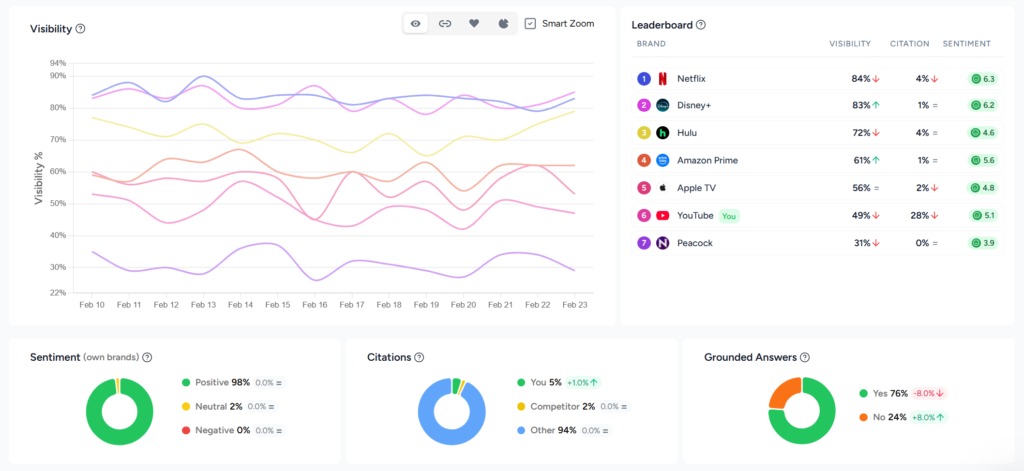
Use purpose‑built LLM tracking tools to automatically send a set of prompts to ChatGPT, detect brand mentions and track AI search metrics like visibility rate, citation rate, share of voice and sentiment. These platforms turn real-time brand monitoring into a repeatable process by collecting and analysing hundreds of responses so you can see where your brand appears across multiple models.
Manual checks are only viable for a handful of prompts. To scale across hundreds of questions and multiple models, specialized tracking platforms automatically query LLMs at set intervals and analyse the results.
How these tools work
Automated LLM trackers send defined prompts to ChatGPT and other models, parse the responses for your brand and competitors, record the sentiment and store the data for analysis. They typically support multiple AI engines (ChatGPT, Gemini, Claude, Perplexity, AI Overviews and others) and allow users to schedule daily, weekly or monthly runs.

For example, Rankshift is an LLM‑visibility SaaS platform built to help you understand how your brand is mentioned in AI search engines and how to improve your visibility. It operates on a credit‑based system that converts two credits into one AI response and lets you choose any combination of models. The platform offers unlimited projects and team seats, supports all countries and languages and allows custom tracking frequency. Entry‑level plans include thousands of credits and there’s a 30‑day free trial.
Other platforms follow similar principles.
Steps to implement
- Define relevant prompts. Brainstorm the questions your audience might ask. Include category queries (“best [your category] for [use case]”), brand comparisons (“[Brand] vs [Competitor]”) and decision‑stage questions (“Is [Brand] worth it?”). A consistent prompt set reduces bias.
- Choose a tracking tool. Select a platform based on budget, model coverage and flexibility. For instance, Rankshift’s credit system scales to multiple models, while other tools offer fixed‑tier pricing.
- Configure your tests. Enter your domain, brand name and competitor names. Specify the prompts, languages and geographic regions you care about. Set the frequency (daily, weekly, or monthly) and decide how many models to test.
- Analyse the results. Look at visibility rates, sentiment and competitor share of voice. Investigate each mention’s context: is the tone positive or negative? Which sources are cited?
- Adjust your content and PR strategy. Use insights from the dashboards to publish or update authoritative content, earn citations from high‑authority sites and engage in communities.
Strengths and limitations
| Aspect | Advantages | Limitations |
| Scale | Runs hundreds or thousands of prompts across multiple models automatically; provides a broad view of your AI visibility. | Requires a Rankshift subscription (plans starting from €77). |
| Consistency | Uses repeatable prompts and schedules to track trends over time; supports sentiment analysis and competitor benchmarking. | Answers still vary between model versions and sessions. |
| Insights | Dashboards reveal inclusion rates, citation coverage and answer placement; tools highlight missed opportunities and top‑performing pages. | Data is only as good as your prompt set; without careful prompt design you might miss important use cases. |
2. Log file analysis and crawler analytics
Analyse your server’s log files to track visits by ChatGPT’s user bots and other AI crawlers.
By filtering logs for these user‑agent strings you can see which pages the model retrieved in response to user prompts and gauge how often AI search engines access your content.
Even the best prompt tracker cannot see what ChatGPT’s retrieval system fetches behind the scenes. Large language models sometimes operate in retrieval‑augmented generation (RAG) mode. RAG is a technique that allows a model to retrieve information from external data sources and incorporate it into its answers, supplementing its training data and reducing hallucinations.
In this mode the model retrieves pages in real time when its internal knowledge is insufficient.
In February 2025, Semrush published a click‑stream study analysing over 80 million ChatGPT interactions from the second half of 2024 and found that about 54 % of queries were handled with the Search mode disabled (answered from internal knowledge), while ~46 % used the web search feature for live retrieval.
Because there is no AI search console (except for Bing that launched their AI performance dashboard in February 2026), the only way to see these retrievals is to analyse your own server logs.
Understanding AI bots
AI bots fall into three categories:
- Training bots (e.g., GPTBot, anthropic‑ai) scrape large swaths of the web to build or update the model’s training set. They don’t reveal how your content is used and can be blocked to protect proprietary data.
- Search bots (OAI‑SearchBot, PerplexityBot, Claude‑Searchbot) index pages for the model’s live retrieval function. They crawl less frequently than Googlebot and favour newly published content.
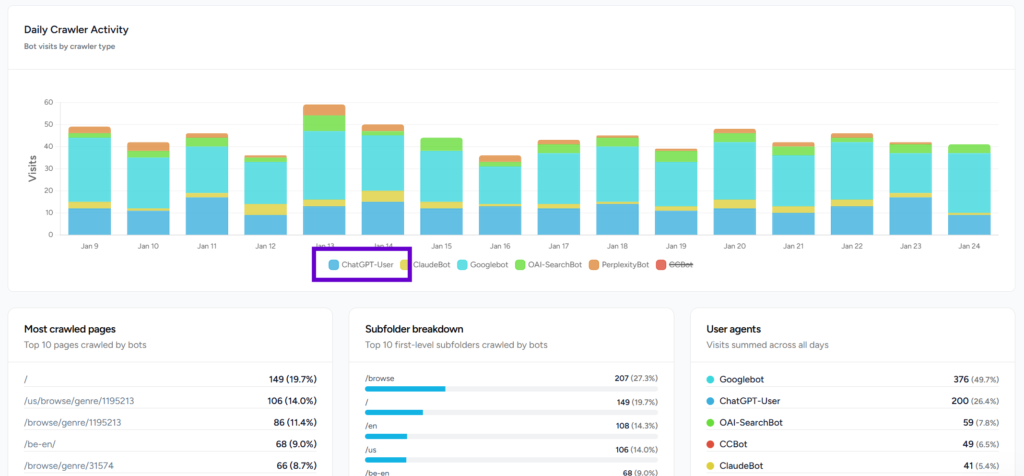
- User bots (ChatGPT‑User, ClaudeBot, Perplexity‑User) fetch specific pages when a user prompt requires citations or additional context. The frequency of these hits roughly maps to AI “impressions”.
Because AI crawlers fetch only raw HTML and do not execute JavaScript or cookies, their visits do not appear in standard analytics like GA4. Bots rely on the site’s robots.txt file (a simple text file that tells web crawlers which parts of a site they should or should not access) but they ignore client‑side scripts.
Server logs are text documents that record all activity related to a web server; they capture the client IP address, timestamp, requested file and response code. By examining these logs you can filter for AI bots and analyse their behaviour.
How to analyse AI bot traffic
- Collect and clean logs. Export server logs from your hosting provider, CDN or reverse proxy for at least one month. Filter for successful status codes (200/304) and normalise URLs by removing tracking parameters.
- Identify AI user‑agents. Use the known user‑agent string (ChatGPT‑User) to isolate training, search and user bots. To monitor real-time brand mentions, focus your analysis on user bots, as training bots offer little insight.
- Aggregate and label pages. Group requests by URL and count visits. Label each page by category, funnel stage or topic using manual tagging or LLM‑assisted classification. This helps you see which topics or products attract AI attention.
- Map to user journeys. Determine whether bots fetch top‑of‑funnel educational content or bottom‑funnel product pages. This reveals how AI search guides users through your site.
- Calculate visibility and CTR proxies. Compare bot visit counts with human traffic (from analytics) to estimate a rough click‑through rate: human clicks ÷ bot hits × 100. Pages with many bot visits but few human clicks may need better calls‑to‑action; pages with no bot visits might require server‑side rendering or improved internal linking.
- Investigate missed hits and technical issues. Identify pages that bots visit without citing (often due to client‑side rendering, paywalls or incorrect status codes). Check for pages with high human traffic but no bot visits; these may be invisible to AI because of robots rules or rendering issues.
- Repeat and monitor over time. AI crawlers change behaviour after model updates; for instance, the ChatGPT Search update in June 2025 and the GPT‑5 release in August 2025 altered crawl patterns. Regularly compare bot traffic month over month to detect shifts in interest or new user‑agent strings.
Turning insights into action
Logs reveal more than raw requests. They tell you:
- Volume of AI visits and top crawled pages. Count how many times user bots request your pages and which URLs are most frequently accessed.
- Trends over time. Measure whether bot traffic rises or falls after model updates or marketing campaigns.
- Missed citation opportunities. Identify pages that are crawled but never cited due to client‑side rendering or status code issues.
- Language and topic segmentation. Break down bot traffic by language or product line to prioritise content where AI demand is highest.
- Bot behaviour and updates. Observe new user‑agent strings, crawl frequency changes and whether bots respect robots rules.
To act on this data, ensure your important content is served as static HTML (AI bots do not execute JavaScript) and use server‑side rendering or static site generation. Keep pages updated; RAG is triggered when the model’s knowledge is outdated. Structure content with clear headings, lists and tables and handle redirects properly to avoid losing citations. Finally, verify that firewalls and security tools do not block user bots.
Platforms like Rankshift’s log file analyser automate much of this work. They ingest raw logs, recognise AI user‑agent strings and present dashboards showing bot visits, trending topics and language distributions. The tool highlights missed citation opportunities and never‑crawled pages so marketers can prioritise content updates.
Strengths and limitations
| Aspect | Advantages | Limitations |
| Visibility | Provides the only reliable window into AI retrieval behaviour: ~46 % of ChatGPT queries trigger live retrieval; logs reveal which pages are accessed and how often. | Only shows retrieval‑based interactions; does not cover answers generated from internal training data. |
| Actionable insights | Identifies technical blockers (e.g., client‑side rendering, status codes), pages with high AI interest and missed citation opportunities. | Requires server access and technical knowledge; processing large logs can be resource‑intensive. |
| Trend monitoring | Detects shifts in bot behaviour after model updates and helps prioritise content updates. | Bot behaviour is opaque and can change quickly; user‑agent strings are not always documented. |
3. Manual checks in ChatGPT
Perform your own tests by entering typical customer questions into ChatGPT and noting how it mentions your brand and competitors. This hands‑on method is free and provides immediate insight but does not scale beyond a small number of prompts.
For solo founders or teams without budget for tools, manual testing is a straightforward way to understand how ChatGPT responds to your brand. It involves entering prompts into ChatGPT (or other LLMs) and observing the answers. The approach provides immediate insight but remains limited in scope.
How to perform manual checks
- Brainstorm customer questions. Think like your audience: what queries would they ask when looking for products like yours? Sitesignal suggests prompts such as “What are the best tools for [your niche]?”, “Which company offers [service] for [target market]?” and “Top alternatives to [competitor]”.
- Test variations. Try different phrasings, synonyms and question structures. ChatGPT’s responses can change based on prompt wording and conversation history. GenRank recommends including direct brand queries (“What is [Brand Name]?”, “Compare [Brand] vs [Competitor]”) and broader industry questions (“What should I look for when buying [product type]?”).
- Log your findings. Record the date, prompt and answer in a spreadsheet. Note whether your brand is mentioned, how it is described and which competitors appear. Categorise the tone (positive, neutral or negative) and capture any citations.
- Repeat regularly. Responses fluctuate due to model updates and randomisation, so run your set of prompts on a consistent schedule (weekly or monthly). Vary the session or location to detect regional differences.
- Cross‑check other models. Perform similar tests on Gemini, Claude, Perplexity and other LLMs to get a fuller picture of AI visibility.
Pros and cons
| Aspect | Pros | Cons |
| Cost | Completely free; no setup or subscription needed. | Time‑consuming and labour‑intensive; impractical for more than a handful of prompts. |
| Ease of use | Helps you understand how AI describes your niche and identify obvious gaps; allows you to see the exact context of each answer. | Results are snapshots; there is no history or trend data. Easy to bias outcomes by changing prompt phrasing, and responses vary by user and session. |
| Scalability | Suitable for early exploration or solo founders, and for spot‑checking competitor positions. | Does not scale; cannot monitor continuously or across multiple models. |
Final thoughts
Monitoring real‑time brand mentions in ChatGPT requires a multi‑layered approach. To get a complete picture of how often the model names your company, you must combine automated tracking, log analysis and manual checks. Each method covers a different aspect: tracking tools reveal how often your brand appears in controlled test prompts across multiple models, log analysis shows which pages ChatGPT retrieves in real time, and manual checks let you interpret the tone and nuance of individual responses.
- Automated LLM tracking tools offer scale, consistency and rich analytics; they convert a curated prompt set into dashboards showing inclusion rates, sentiment and citation coverage.
- Log file analysis exposes how often AI user bots fetch your pages and identifies missed opportunities to improve technical SEO and content.
- Manual checks remain a free way to get a snapshot of how ChatGPT talks about your brand, though they quickly become impractical as your prompt list grows.
By combining these methods, marketers can understand where their brand stands in AI‑driven conversations and take proactive steps to improve AI visibility. Ensure your content is authoritative, structured and served as static HTML to make it accessible to AI crawlers. Earn citations from high‑authority sources, keep data consistent across the web and participate in communities to build credibility.
Most importantly, track and adapt: generative AI systems change rapidly, and staying visible requires continuous monitoring and optimisation.
