
Your GEO tool can track AI visibility perfectly and still be useless to you. If the prompts feeding it don’t match how your buyers actually talk to ChatGPT, no amount of optimization moves the needle.
After talking to a few hundred brands about this, I can name the mistake almost everyone makes on day one: they treat a prompt list like a keyword list. Dump in everything that looks relevant, hit save, watch the dashboard fill up, and realize months later that the whole set was off, because not one of those prompts reflected a real buyer.
The fix isn’t a better tool. No matter which AI visibility tool you use, it will track exactly what you feed it, on schedule, forever; with no opinion about whether any of it is worth tracking. That judgment is yours. It’s not a setup step before the real work; it is the real work.
Get it right and your dashboard becomes a decision engine. Get it wrong and you’ve bought a very accurate way to be wrong.
This blog post covers the two things that actually decide whether your tracking earns its cost: how to find prompts worth tracking; nine concrete sources, and how to choose the prompts from what you find. Everything here is what survived real accounts, not just planning doc.
Why prompt selection is important
People keep saying “prompts are the new keywords,” but that’s not really the case.
The first thing you need to do is: unlearn the keyword.
For fifteen years, SEO trained you to think in keywords: discrete strings with a search volume, a difficulty score, and a ranking position you could chart over time. That model runs so deep most marketers don’t notice they’re using it. However, it does not survive contact with AI search.
Simply, a keyword has data behind it. “Top LLM tracking tools” has a search volume and a ranking you can check. You don’t really choose it; you look it up, see the demand, and decide whether to compete.
A prompt has none of that. Nobody publishes how often a question gets asked, and the phrasing changes every time someone asks it.
SparkToro and Gumshoe asked 142 people to write a prompt for the same need, and the average similarity between those prompts was just 0.081, roughly no shared wording at all.
So adding a prompt to a tracker isn’t a measurement. It’s a bet: a guess that some real group of your buyers asks roughly this way, and that watching this phrasing tells you something true about that group.
That changes how many prompts you need. Not all of them, just a set of good ones, small enough to manage and reviewed often enough to stay useful.
It also costs you to over-collect. Rankshift, like most tracking tools, runs on a credit model: your spend is prompts × models × refresh frequency. A set of 300 loose prompts burns credits, and worse, it buries the two prompts that actually needed your attention. A tight set isn’t just cheaper. It’s the only kind you’ll actually read.
Now let’s move to the most important part: Know -> Find -> Choose.
Part 1: Know what you’re looking for
Before you go hunting for prompts, you need to know what kind of prompts you’re hunting for. Skip this and you’ll collect 80 prompts that all do the same job, then wonder why your dashboard has blind spots.
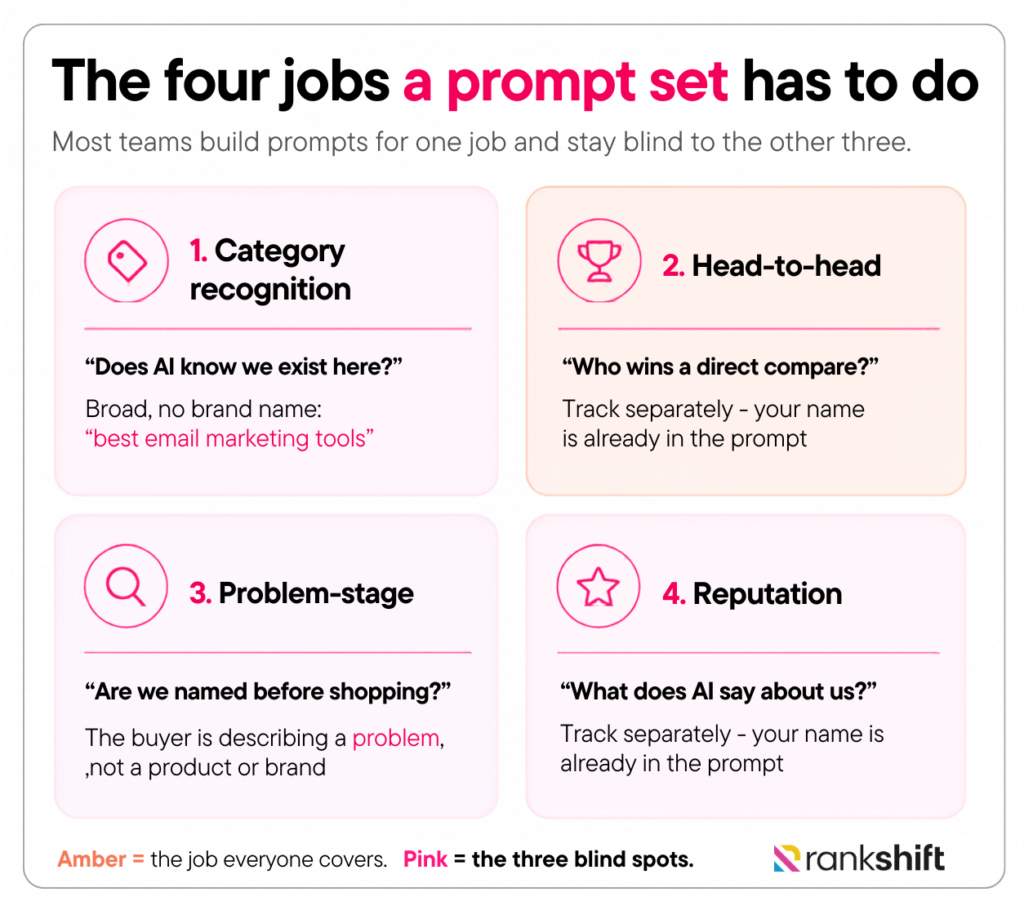
Forget the buyer funnel for a second. A better way to think about it: a complete prompt set has to answer four different questions about your brand. Each one is a separate job, and most teams only build prompts for one of them.
Job 1: Category recognition – “Does AI know we exist in this space at all?” These are broad prompts with no brand name in them: “best email marketing tools,” “top CRMs for startups.” If you’re absent here, nothing else matters yet, the model doesn’t see you as a player in the category, so it can’t recommend you within it. This is the foundation, and it’s the job teams most often skip.
Job 2: Head-to-head – “When a buyer compares us to a specific rival, who wins?” “Salesflare vs HubSpot,” “Notion or Asana for a small agency.” This is the job everyone builds for, it feels closest to revenue. It is important. It’s just not the whole picture.
Job 3: Problem-stage – “Does AI mention us before anyone is shopping?” The buyer is describing a problem, not a product: “why do sales reps keep missing follow-ups?” Show up here and you shape how the buyer understands the problem before a single competitor enters the conversation. Underrated, under-tracked.
Job 4: Reputation – “What does AI actually say about us by name?” “Is Rankshift any good?”, “Rankshift reviews.”Your visibility here is near-guaranteed, your name is in the prompt, so this job isn’t about whether you appear. It’s about whether the model says something accurate, current, and not quietly damaging.
Here’s the point. When I audit a tracking set, it’s almost always 80% Job 2. That team can tell you how they fare in a head-to-head and nothing else. They can’t see whether AI understands their category (Job 1), whether they’re shaping early-stage buyers (Job 3), or whether the model is repeating a two-year-old criticism of them (Job 4). Three blind spots, and they don’t know they have them.
So as you move into finding prompts, hold these four points in mind.
Part 2: How to find prompts worth tracking
Brainstorming prompts feels productive and produces garbage. You’ll write down the prompts you would type, and you are not your customer. You know your product category too well; real buyers are vaguer, more frustrated, and more specific about their own situation than you’ll ever guess.
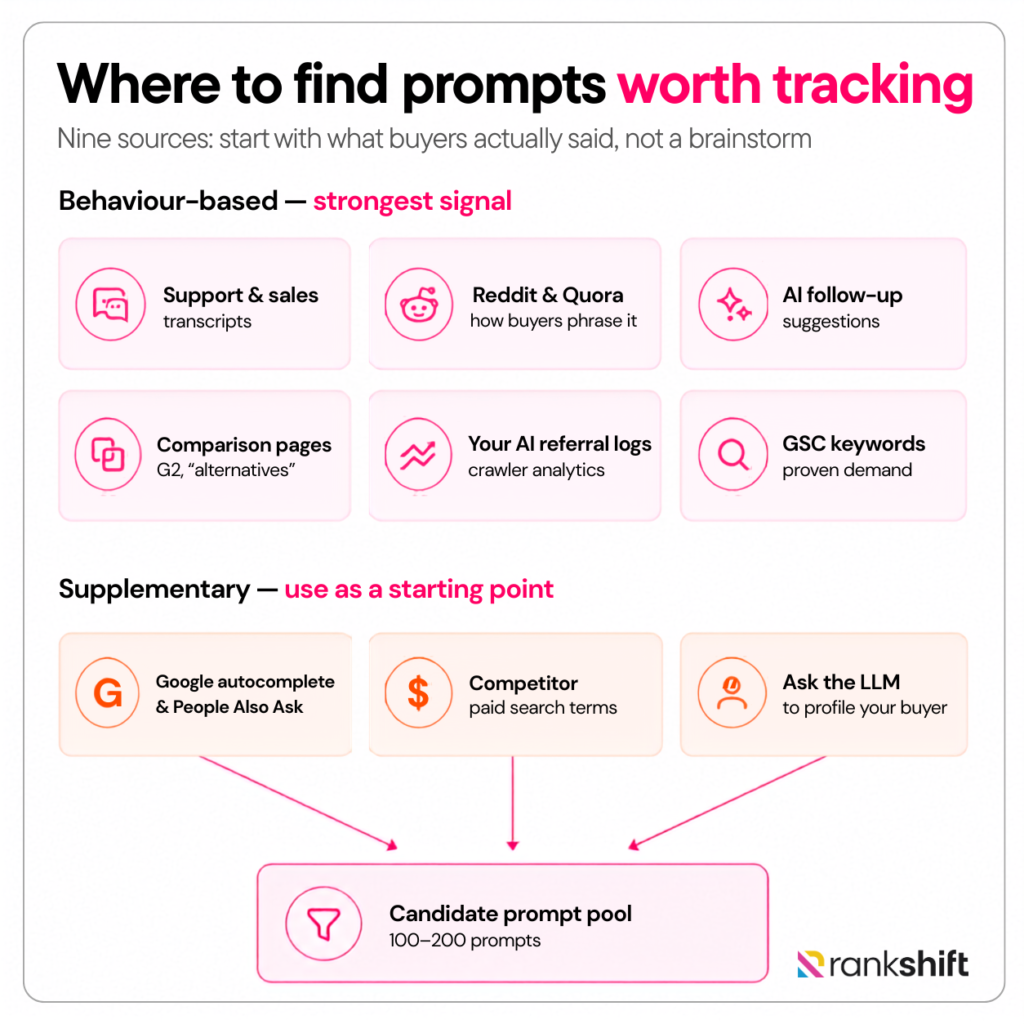
So don’t guess. Go where buyers have already left fingerprints. Here are nine places where you can find relevant prompts:
1. Mine your customer support and sales transcripts
This is the single best source and almost nobody uses it. Your support inbox and your sales call recordings are a transcript of real people describing real problems in their own words, before any marketer “cleaned up” the language.
Pull six months of support tickets and sales-call notes. Look for the recurring phrasings. “We kept losing track of which rep owned which deal” isn’t a prompt yet, but it converts cleanly into one: “How do small sales teams stop deals from falling through the cracks?” That phrasing came from a customer, which means it’s far closer to how the next buyer will prompt an AI than anything you’d compose.
If you’re a B2B brand, your win/loss interviews are gold here. The question a prospect asked right before they chose a competitor is, almost word for word, a prompt you need to be visible on.
2. Read the way people actually ask on Reddit and Quora
Community threads phrase problems the way humans phrase them, “I’m drowning in…”, “can anyone recommend…”, “why does my…”, which is exactly the register people use with AI.
But there’s a second, structural reason to prioritize this source. Reddit content is heavily represented in the data these models learned from, and it shows up disproportionately as a cited source in AI answers.
So a Reddit-style question isn’t just realistic phrasing, it’s phrasing the model is unusually well-tuned to. When I built a set for a project-management client, the prompt that exposed our biggest gap came from a Reddit thread titled something like “why does my team abandon every PM tool after a month.” No keyword export would ever have handed me that.
3. Harvest the AI’s own follow-up suggestions
This one is almost too easy. Ask ChatGPT or Perplexity a starter question in your category, then look at what it offers as follow-ups, the “people also ask” style rail underneath the answer, or Perplexity’s suggested next questions.
These are the model’s own prediction of what a real user wants to know next, generated from patterns across millions of conversations. Run three or four starter prompts, collect every follow-up, and you’ve got a list of naturally-phrased questions that the AI itself considers logical next steps. It’s the closest thing to a free prompt-volume signal you’ll find.
4. Reverse-engineer comparison and “alternatives” pages
Search [competitor] alternatives or [competitor] vs and read what comes up, on G2, on Reddit, on competitors’ own comparison pages. Every one of those pages is a map of how buyers frame a decision in your category.
A page titled “Salesflare vs HubSpot for small teams” tells you a real comparison is happening. That converts directly into a trackable prompt: “Is Salesflare or HubSpot better for a small sales team?” The comparison set someone built into a landing page is a comparison set buyers are actually running through an AI.
5. Convert the keywords you already rank for
If you have any SEO history, start here too. Export your top non-branded keywords from Google Search Console and rewrite each as a natural question. For example, email automation ecommerce becomes “How do I set up email automation for my online store?”
The advantage isn’t the phrasing, it’s the proof. These topics already have demonstrated demand behind them. In a world with no prompt volume, a keyword with real traffic is the strongest demand signal you can borrow.
6. Read Google autocomplete and “People Also Ask”
Type a seed phrase into Google and watch autocomplete finish it. Then expand the People Also Ask boxes. Both are real aggregated queries, already phrased the way humans phrase things, and PAA questions in particular are nearly prompt-ready as-is.
Quick tip worth knowing: note which of your keywords trigger an AI Overview at all. If Google decides a query deserves an AI answer, that’s Google telling you the query is “AI-answerable,” a strong nudge that it belongs in your tracking set.
7. Pull your competitors’ paid search terms
If a competitor is spending money to bid on a term, they’ve validated with their own budget that the topic converts. Pull their paid keywords, filter for three-word-plus terms with commercial intent, and convert the strong ones.
A competitor bidding on “CRM for construction companies” has effectively told you that “What’s the best CRM for construction companies?” has buyers behind it.
8. Ask the LLMs to profile your buyer
Go to the source and ask it directly. Prompt ChatGPT or Gemini with: “Someone is evaluating [your category] for the first time. List 15 questions they’d realistically ask an AI before deciding.”
Then a second pass: “What worries or objections would they have about [category]?” You’ll get a usable starter list of conversational prompts.
One firm rule: this is raw material, never a finished set. The model produces plausible questions, not your audience’s questions. Cross-check everything here against what you found in sources 1 and 2.
9. Read your own AI referral traffic
This source only exists once you’ve started, and it’s the most honest of all. Check your analytics for sessions referred by ChatGPT, Perplexity, or Gemini, and check your server logs or Rankshift’s crawler analytics for which of your pages AI bots are actually pulling.
If an AI is already sending you visitors or crawling a specific page hard, there is a live prompt out there triggering it. Work backward: which question would surface this page? That question is already proven to involve you. Add it, and track whether you hold the position.
Part 3: How to choose which prompts to actually track
Run those nine methods and you’ll have a messy list of 100 to 200 candidate prompts. But that’s a raw one, now let’s refine it. Run every prompt through these five checks and let the weak ones fall away.
1. Score it for “would I even show up here?”
The first cut is brutal and fast. For each prompt, ask: would this answer realistically feature my brand or a direct competitor? If a prompt is too broad, “What is a CRM?” no specific brand wins it; the AI just explains a concept. If it’s too tangential to your category, same result.
Keep the prompts where a named brand like yours could plausibly appear. “Best CRM for marketing agencies” passes. “What is a CRM” doesn’t. Interesting is not the bar. Eligible is.
2. Score it for influenceability, check who AI cites today
This is the check teams skip, and it’s the most important one. A prompt where you could appear isn’t worth tracking if you have no path to actually getting there.
For each surviving prompt, run it and look at what the AI cites. If the answer leans entirely on Wikipedia, government sites, and untouchable mega-authorities, deprioritize it, you’ll be staring at a number you can’t move. But if it cites listicles you could pitch your way into, Reddit threads, YouTube videos, or mid-tier blogs, that’s a winnable prompt.
This is exactly what Rankshift’s citation analysis is for: it shows you which sources feed each answer, so you can separate “visible but frozen” prompts from “visible and improvable” ones before you commit a credit to them.
3. Score it for revenue proximity
Every prompt you keep should connect to something that makes money; a product line, a core use case, a buying-stage decision. If you can’t draw a straight line from the prompt to a business outcome, you’re tracking trivia that feels like insight.
Be honest here. An awareness-stage prompt can absolutely earn its place, but only if you can articulate why showing up there eventually leads to a customer. If the best you’ve got is “it’s related to our space,” cut it.
4. Score it for specificity, then sharpen what survives
Broad prompts produce mush. “Best project management tool” is both too competitive to win and too generic to teach you anything, because it ignores how AI actually behaves: it personalizes.
Real users load their prompts with context like team size, industry, budget, the specific job.
So sharpen the survivors. “Best project management tool” becomes “Best project management tool for a remote marketing agency of 15.” The narrowed version is easier to win, mirrors how AI tailors its answers, and produces data you can act on instead of stare at.
Check the set against all four jobs
The first four checks the judge prompts one at a time. This last one judges the set. Pull back and lay your survivors against the four jobs from Part 1; category recognition, head-to-head, problem-stage, reputation.
You’ll almost certainly find the pile is lopsided toward head-to-head, because comparison prompts are the ones that feel like money when you’re sourcing. Resist it. A set that’s 80% head-to-head can’t tell you whether AI recognizes your category or what it says about you by name.
Before you add a fifth comparison prompt, ask whether the other three jobs have enough coverage to be worth reading. Breadth across the four jobs beats depth in one.
The one question that does the work of ten
Scoring frameworks are useful, but in practice you’ll have a fast gut call to make on dozens of prompts.
Here’s the single question that replaces the whole checklist when you’re moving quickly:
“If a competitor showed up in this answer instead of me, would it cost us a deal?”
That’s it. If the honest answer is yes, losing this answer to a rival would genuinely lose you business, the prompt belongs in your set. If the answer is no, or “not really,” or “I guess it’d be nice to have,” cut it, however interesting it looks.
This works because it collapses every other criterion into one. A prompt where a competitor’s presence would cost you a deal is, by definition, eligible (a brand can win it), influenceable enough to matter, revenue-proximate, and specific enough to involve real buyers.
The question quietly checks all four. Lead with it, and use the full five-point scoring pass only for the prompts that survive this first cut.
When to kill a prompt
Review your set every 30 to 60 days and retire any prompt showing one of these three signs:
- It’s flatlined: Six weeks of identical data; you appear, or you don’t, and nothing moves. The prompt isn’t tracking anything anymore; it’s just spending credits to confirm what you already know. Pull it.
- You can’t influence it: You’ve watched it for a month, and the citations are still locked up by authorities you’ll never displace. Acknowledge it: this is a number you can observe but not change. It belongs in a quarterly spot-check, not your live set.
- It’s drifted off-strategy: The prompt was relevant when you added it, but your positioning, your ICP, or your product moved on. If you can no longer draw the line from this prompt to a real outcome, it’s a leftover. Cut it and reinvest the credit in a prompt that reflects who you are now.
Killing prompts isn’t admitting a mistake. It’s the maintenance that keeps the set sharp enough to be worth reading.
Learn more about how often you should track prompts.
Getting started without overcomplicating it
The instinct, once you’ve read all this, is to build the perfect set on day one. Don’t. A first tracking set is a draft, you’ll learn more from 30 days of real data than from a month of planning. Here’s a setup that works for most brands and keeps things cheap enough to be wrong:
- Total prompts: 30 (per product, segment or category). Resist more until the first batch has actually taught you something.
- The mix: cover all four jobs from Part 1, category recognition, head-to-head, problem-stage, reputation. Keep the reputation prompts (your brand name in them) in their own group, so near-guaranteed visibility there doesn’t inflate your category score.
- Models: 2 to 3, not all of them. ChatGPT for reach, Perplexity because it shows its citations openly, and Google AI Overviews or AI Mode because they map to traditional search intent.
- Patience: judge nothing for 30 days. AI answers shift run to run, so a single snapshot is meaningless. Treat month one as calibration, not a verdict.
Then revisit. Kill the prompts that flatlined, sharpen the ones that were too broad, and add the new questions that surfaced from AI follow-up suggestions. The set gets better because you do.
This is also where the tool you pick starts to matter. The reason I keep mentioning Rankshift is that this whole approach; start small, expand only when a prompt earns it, depends on being able to control the three things that drive your cost: how many prompts you track, across how many models, at what refresh rate.
Rankshift’s citation analysis does the influenceability check from Part 3 for you, and its crawler analytics feed source #9.
If you’re setting up your first 30 prompts, start there, track a tight set, read it honestly, and grow it from evidence instead of guesswork.
Start Tracking Prompts with Rankshift AI
The prompt list is the strategy. Not the tool, not the dashboard, the 30 prompts you choose are the lens you see your entire AI visibility through, and a bad lens shows you a clear version of the wrong thing.
Most teams will get this wrong in 2026, because the keyword-era instinct is strong: collect everything, track everything, sort it out later. The teams that get it right will look almost lazy by comparison, a small set, four jobs covered, sourced from what buyers actually said, pruned every month without sentiment.
A tool like Rankshift makes that discipline affordable to keep: it tracks your tight set, shows which sources feed each answer so you know what’s winnable, and flags prompts that have gone quiet. It won’t choose your prompts for you, that part is judgment. But once you’ve chosen them, it does the rest.
Start tracking your AI visibility free with Rankshift
Build your first 30 prompts, see where you stand across ChatGPT, Perplexity, and Google’s AI, and grow the set from evidence instead of guesswork.
