
Large language models (LLMs) have shifted how people search for information. In traditional search, optimisers could analyse keywords, page rankings and clicks. AI search is more opaque because conversational assistants sometimes answer questions from their training data and other times retrieve fresh information through retrieval‑augmented generation (RAG).
A recent clickstream study covering 80 million ChatGPT interactions found that 54 % of queries were handled without web search while 46 % triggered the system to fetch live information. With no “AI Search Console”, the only way to see how LLMs interact with your content is by reading your own server logs.
What are log files?
Log Files are server-side records that capture every request made by (AI) crawlers (such as ChatGPT, Gemini, and Perplexity) to a website. These logs document which AI bots visit, what content they access, their return frequency, and any errors or access issues encountered.
Log files contain critical data including timestamps, user agents, requested URLs, IP addresses, and status codes, which enable teams to verify legitimate bots and diagnose crawl friction.
AI search log files are important for Generative Engine Optimization (GEO), helping organizations optimize content accessibility and improve AI visibility across all major LLMs.
Why are log files important for AI search?
AI chatbots and AI-powered search interfaces access web pages very differently from human users.
Most AI crawlers, including those used by ChatGPT, Claude, Perplexity, and similar assistants, fetch only the raw HTML of a page. They do not execute JavaScript, wait for scripts to load, or interact with menus. Any content or links injected client-side are effectively invisible to them.
Because these bots bypass scripts and cookies, their visits do not register in standard analytics tools such as GA4. Multiple technical analyses show that crawlers like GPTBot routinely fetch pages and extract snippets, yet none of this activity appears in Google Analytics. Without server-side logging, it can look as though traffic is declining even while AI systems are actively reading your content.
There are additional complications. AI models often cache crawls, follow redirects inconsistently, or fetch one URL while attributing it to another. Their behavior also changes over time. For example, the ChatGPT Search update in June 2025 and the GPT-5 release in August 2025 both altered crawl patterns.
These nuances mean that seeing a page hit in your logs does not guarantee it will be cited or surfaced in an AI-generated answer. Only long-term inspection of server logs reveals which pages are accessed, skipped, cached, or blocked, and how those patterns evolve.
Which AI bots are actually accessing your site, and how do they behave?
Not all AI bots serve the same purpose. Understanding the intent behind each user‑agent helps you decide what to monitor and which requests to allow or block. We can divide AI crawlers in three categories:
| Bot type | Purpose | Example user agent |
| Training bot | Scrapes as many pages as possible to build or update a model’s training set. Data is filtered, classified and sampled before use. Training bots don’t reveal how or whether content is used. | GPTBot for OpenAI; anthropic‑ai for Claude; Cohere or CCBot for Common Crawl |
| Search bot | Indexes pages for the model’s live search feature. In a RAG workflow, the search bot queries an index or a general search engine to find relevant documents. These bots crawl less frequently than Googlebot (often once per day) and favour newly published pages. | OAI‑SearchBot, PerplexityBot, Claude‑Searchbot |
| User bot | Fetches a specific page when a user’s prompt requires citations or additional context. User bots show how often chatbots try to use your content in real‑time. The frequency of these hits roughly maps to AI “impressions,” though not every hit results in a visible citation. | ChatGPT‑User and its 2.0 variant for OpenAI; ClaudeBot for Anthropic; Perplexity‑User for Perplexity; MistralAI‑User |
When you analyse log files, focus on user bots and search bots because they directly reflect AI search behaviour. Training bots can be blocked if you don’t want your content used in model training, but they provide limited insight.
How does RAG work and why it leaves traces
Retrieval-Augmented Generation (RAG) links a large language model to an external knowledge source.
Instead of generating answers solely from its training data, the system retrieves relevant documents at query time and injects them into the prompt. This approach is especially useful when users need fresh, factual, or domain-specific information.
The process has three steps. First, a retriever searches a document store for relevant pages. Next, the augmentation step combines the user query with the retrieved passages. Finally, the generator produces an answer based on that enriched prompt.
Because retrieval happens in real time, the bots that power RAG leave traces in server logs whenever they fetch pages. You will not see user prompts or questions, but you can often infer topics from the URLs and content being requested.
Not every AI query triggers retrieval. In the study referenced earlier, 46 percent of ChatGPT interactions used the search feature. Roughly half of all queries therefore create visible bot traffic, while the rest are answered from the model’s internal knowledge.
For this reason, log analysis offers a partial but valuable view of AI demand. It shows when external content is consulted, even if it cannot reveal the full intent behind every query.
What log files can tell you
A properly collected server log captures every HTTP request: IP address, timestamp, URL, status code and user‑agent. By filtering these logs for AI user‑agents you can answer questions that conventional SEO tools cannot:
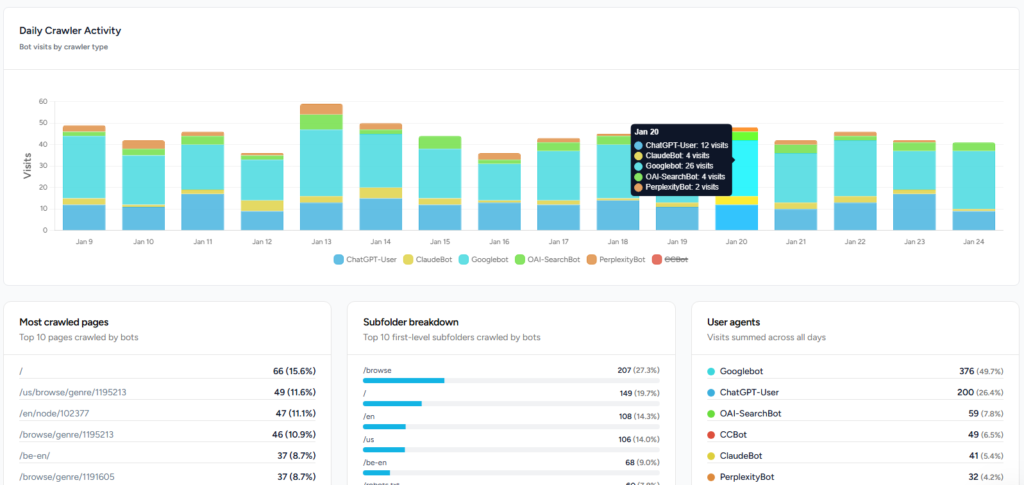
- Volume of AI bot visits and unique pages – Count how many times user bots request your pages and how many distinct URLs they hit.
- Trends over time – Measure whether bot traffic is rising or falling and identify spikes after model updates.
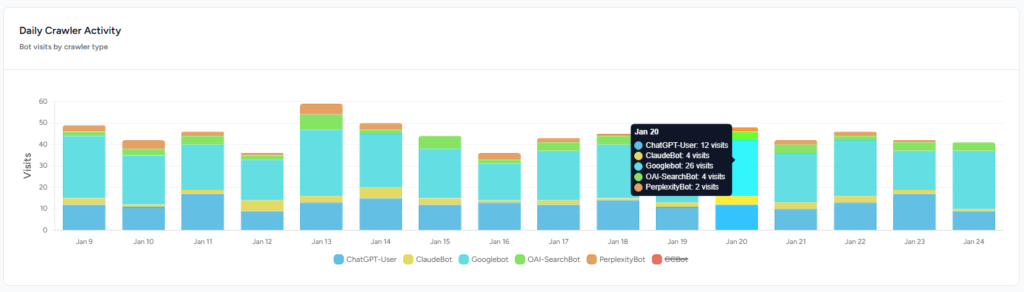
- Top crawled pages – Identify which articles or product pages are most frequently fetched. High bot interest in a topic suggests users are asking about it in AI chat.
- Impressions vs. clicks – Combine log data with analytics or search console clicks to estimate a “click‑through rate” for AI search: (human clicks ÷ bot hits) × 100.
- Missed citation opportunities – Spot pages that bots fetch but do not cite, often because of client‑side rendering, paywalls or wrong HTTP status codes.
- Gaps in coverage – Find pages that rank in Google but are never crawled by AI bots. This helps prioritise content updates and technical fixes.
- Language and topic segmentation – Break down bot traffic by language, article category or page type to see which segments drive AI engagement.
- Bot behaviour and updates – Watch for patterns such as a new version of a user bot, changes in crawl frequency, or whether bots respect robots.txt rules. Some assistants have stopped reading robots.txt entirely, so monitoring is essential.
These metrics turn server logs from raw data into actionable insights about AI visibility.
How to analyze AI bot traffic?
Understanding which AI bots are accessing your content, and how, is the foundation of effective Generative Engine Optimization. The following seven-step process walks you through extracting actionable insights from your log data, from initial collection through ongoing monitoring.
- Collect and clean your logs: Pull server logs from your host, CDN or reverse proxy for at least one month. Filter for HTTP status codes 200 and 304 to focus on successful requests. Normalise the URLs by removing UTM parameters and query strings.
- Filter by user‑agent: Use the user‑agent strings above to isolate training bots, search bots and user bots. Focus your analysis on ChatGPT‑User, ClaudeBot, Perplexity‑User and similar agents.
- Aggregate and label pages: Group requests by path and count visits per page. To understand topics, assign each page to a category. You can do this manually, by prompting an LLM to classify pages, or algorithmically using embeddings and clustering. A short prompt can ask an LLM to assign each path to an existing topic or create a new one if needed.
- Map to user journeys: Determine whether bots are fetching top‑of‑funnel educational content or mid‑ to bottom‑funnel product pages. This reveals how AI search users move through your offerings.
- Calculate visibility and CTR: For each page or topic, compute the share of total bot visits and cross‑reference with human traffic. A high bot‑visit, low‑click page may need clearer calls to action; a high click‑through may warrant more content in that area.
- Investigate missed hits: Review pages with zero bot visits but significant organic traffic; they may require server‑side rendering or robots.txt adjustments. Check pages with many bot visits but no citations for issues like blocked scripts, paywalls or inappropriate status codes.
- Repeat and monitor: AI bots evolve quickly. Compare bot traffic month over month to catch shifts in interest, new user‑agent strings or crawl behaviours.
Turning insights into action
Analysing log files is only useful if it leads to better content and technical optimisation. Based on the metrics above, consider the following:
- Optimize for static HTML. Since AI crawlers don’t execute JavaScript, ensure key content appears in the initial HTML. Use server‑side rendering or static site generation for important pages.
- Expose fresh information. RAG triggers when the model’s knowledge is out of date. Update pages regularly and publish timely content to increase the chance that search bots index you and user bots fetch your answers.
- Structure content for easy retrieval. Use clear headings, concise paragraphs, lists and tables. Provide citations and data where possible; grounded answers depend on digestible source material..
- Handle redirects and status codes carefully. Bots follow redirects and may treat two URLs as one. Ensure redirects are 301s to canonical pages and avoid serving 200 pages behind paywalls. Monitor 404s and 5xx errors; bots will drop your page from their index.
- Don’t block user bots accidentally. If you use security tools or firewall rules, verify they allow user bots to fetch your pages. Some models ignore robots.txt entirely, so controlling access via server rules is more reliable.
- Expand content where AI interest is high. Pages and topics with high bot hits signal genuine user curiosity. Create deeper or related articles, product comparisons or FAQ pages to capture more AI‑driven attention. Conversely, prune or restructure pages that get no bot visits and low human engagement.
How Rankshift helps
Performing these analyses manually can be tedious. Rankshift’s log file analyser automates the process: it ingests raw logs, recognises AI user‑agent strings and builds dashboards that show bot visits, unique pages, trending topics and language distributions.
The tool highlights missed citation opportunities, pages that are never crawled and segments that drive the most AI‑driven demand. With these insights, marketers can prioritise content updates, fix technical barriers and refine their strategy for AI search.
Conclusion
At this point, there is no official dashboard for AI search, server logs provide the only reliable window into how chatbots interact with your content. By distinguishing training, search and user bots, understanding RAG and tracking key metrics, you can turn raw log lines into actionable insights.
Optimising for AI visibility requires technical excellence: server‑side rendering, clean status codes and proper robots handling, as well as content that is current, structured and authoritative. With a dedicated log analyser like Rankshift, you can win in AI search.
Sources
Kelly B, Harsel L. Investigating ChatGPT Search: Insights from 80 Million Clickstream Records. Semrush Blog. https://www.semrush.com/blog/chatgpt-search-insights/. Published February 3, 2025.
Salomon J. What log files tell about your visibility in AI Search. Speaker Deck. https://speakerdeck.com/oncrawl/what-log-files-tell-about-your-visibility-in-ai-search. Published October 21, 2025.
