
New ad platforms don’t come along very often. Google search ads, the Meta feed, TikTok: each one opened a window where the brands that moved early got cheaper reach and less competition than everyone who showed up later. ChatGPT ads are the newest window. OpenAI has rolled out a self-serve ads manager, dropped the minimum spend, and turned on cost-per-click bidding, which means you can now run a real campaign on a test budget.
I’ll be honest up front, because the hype around this is loud and the reality is more mixed. The platform is very new, the targeting is a black box compared to Google or Meta, and the reporting is thin. Setting up a campaign is genuinely quick. Getting it to perform is the hard part, and not everyone is seeing conversions yet.
So this is a practical walkthrough: what ChatGPT ads are, how to set your first campaign up correctly, and what to actually expect once it’s live.
What ChatGPT ads are (and how they show up)
A ChatGPT ad is not a search ad and not a feed ad. When someone asks ChatGPT a question related to your industry, your ad can appear underneath the answer, clearly labeled as sponsored and visually separated from the model’s response. ChatGPT answers the question, and your ad sits below it in the same conversation.
A few things worth knowing before you spend anything:
- There are a handful of ad formats. A sponsored placement (brand name, a short headline, a one-line description, and a link), a shopping carousel of product cards for ecommerce, and a larger image format with a call-to-action button that has been in testing. OpenAI keeps adding to these, so the list may look different by the time you read this.
- Not everyone sees ads. At the time of writing, ads are shown to free users, not to people on paid plans, and never to users under 18. They also don’t appear in conversations about politics, health, or mental health.
- Targeting works differently. There are no keyword lists and no audience uploads in the Google sense. ChatGPT targets based on the conversation the person is in right now, plus optional personalization from their history. You describe the context you want to reach, and OpenAI handles the actual delivery. You never see the underlying chat content.
That last point matters for expectations. You’re reaching someone mid-thought rather than mid-scroll, which is a strong intent signal, but you also give up a lot of the control you’re used to.
Before you build anything: check what ChatGPT already says about you
Here’s the step most tutorials skip, and it’s the one that decides whether your budget works.
Because your ad appears directly under the organic answer, the two are read together. If ChatGPT already mentions your brand when people ask about your category, your ad reinforces a recommendation the person just got. If ChatGPT has never heard of you, your ad lands cold and gets dismissed, and you’ve paid for the impression anyway.
So before you touch the ads manager, open ChatGPT and type the questions your customers actually ask before they buy. Note which brands come up. If yours isn’t one of them, that’s your real priority, and it’s worth measuring your visibility across the AI engines properly rather than eyeballing a few prompts. Paid and organic aren’t separate channels here the way they are on Google. You can buy the ad slot, but you can’t buy the recommendation sitting above it.
With that baseline in hand, here’s the setup.
Step 1: Create your ads manager account
Go to ads.openai.com and sign up. Account setup takes roughly 10 to 15 minutes: you verify your business, add a payment method, and agree to the ad policies. OpenAI reviews each advertiser manually, so approval can take a little longer in some cases.
Availability depends on where your business is registered. ChatGPT Ads started in the US before expanding to the UK and several Asian and Latin American markets. OpenAI announced its expansion to 31 European countries on August 18, 2026, with self-service Ads Manager access available across those markets from August 31, 2026. Read the European rollout announcement. If self-service access isn’t available in your country yet, you can still sign up for an account and receive a notification when access opens. Check the current list of supported countries before getting started.
Step 2: Set up conversion tracking
Do this before you launch, not after. You want to be measuring from the first impression.
In the ads manager, go to Tools, then Conversions, and create a new data source. Name it (something like “Pixel GTM” if you’re using Google Tag Manager), and you’ll get a pixel ID. We have a full guide on setting up conversion tracking for ChatGPT ads here.
The cleanest way to install it is through Google Tag Manager:
- In Tag Manager, create a new tag and open the Community Template Gallery.
- Search for OpenAI and add the official OpenAI measurement pixel template. This replaces the old custom-HTML approach, so you no longer need to hand-code anything.
- Paste in your pixel ID, and set the base tag to fire on all pages (respecting consent where that’s required by law).
That’s your base pixel. To track an actual conversion, create a second tag using the same template, choose the event type you care about (lead created, checkout started, order created, trial started, and so on), and attach a normal trigger, for example a page view on your thank-you or confirmation URL. It’s the same logic you’d use for a Google Ads or GA4 event. For fuller measurement, you can also connect OpenAI’s conversions API.
Once it’s live, use the event stream in the ads manager to confirm events are coming through before you rely on the data.
Step 3: Build the campaign
The account structure will feel familiar if you’ve used Google Ads: campaigns, then ad groups, then ads.
When you create a campaign, you’ll pick an objective, which also sets your bid strategy:
- Reach, billed on CPM
- Clicks, billed on CPC
- Conversions, which needs a conversion event in place
Start with clicks and CPC. It lets you compare cost per click directly against your Google and Meta benchmarks, and conversion optimization on this platform is still maturing, so clicks is the reliable objective to begin with.
A few settings to get right:
- Budget. You can set a daily budget or a total campaign budget. Watch this one carefully. It’s an easy mistake to type a total budget into the daily field, or the reverse, and spend far more or far less than you meant to.
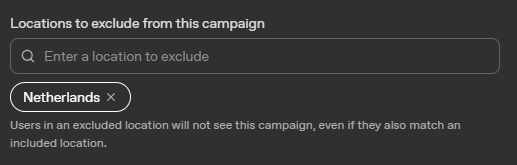
- Locations. Select the countries you serve, and use negative locations to exclude places you don’t. If you run a Dutch-language campaign for a business that only delivers within Belgium, for instance, excluding the Netherlands helps keep your targeting focused.
- Platforms. You can target web, iOS, and Android separately. If you’re B2B and your buyers are on desktops during the workday, web-only can make sense. For B2C, keeping all three on and testing is usually the safer bet. On a small budget, don’t split into separate campaigns per platform; keep it together.
Step 4: Set up your ad group and write context hints
This is where the real targeting happens, so it’s worth slowing down.
Inside the ad group you’ll find context hints: a box where you describe, in plain language, who you want to reach and what they’re trying to do. You can include topics and phrases you want to target and topics you want to avoid. Since there are no keywords or audiences in the traditional sense, this description is doing most of the work.
The common mistake is being vague. “Accounting software, bookkeeping tool, invoicing” barely tells the model anything. Compare that to something specific:
A finance manager at a 20 to 50-person agency comparing accounting platforms because their current tool doesn’t connect to their bank accounts, invoices are tracked in spreadsheets, and reconciling payments takes hours each week.
That second version names the buyer, the situation, and the problem, and it naturally narrows who the ad should reach. You can add negative direction too, for example ruling out people looking for a free tool if your product starts at a certain price.
A good rule: one strong context hint per ad group, and up to about five ad groups per campaign, each with a different angle. That way you can see which framing performs and adjust the ones that don’t.
For bidding, very low CPC bids often won’t deliver. In practice, bids under roughly two to three dollars tend to get flagged as too low, so start around three dollars or a bit higher and pull it down later if you’re comfortably spending your daily budget. Even with a higher maximum set, campaigns often spend under it.
If you have first-party data, you can also upload custom audiences (hashed emails or phone numbers) to include, exclude, or bid-adjust. One catch: you need at least 25,000 matched users to use an audience for inclusion targeting or bid adjustments. Below that, you can still use it for exclusions, which is genuinely useful for filtering out existing customers or recent buyers.
Step 5: Write the ad
The creative fields are tight. At the time of writing, the ads manager gives you one title and one description with fairly short character limits (OpenAI has been changing these, so check the current counts), plus a single image and your destination URL.
That constraint is a feature, not a bug. There’s no room for vague brand language, so every word has to earn its place. Write copy that answers the question your customer is asking right before they decide to buy, and present your product as the direct solution. It should read like a recommendation, not a pitch.
One important quirk: ChatGPT generally doesn’t re-serve the same ad within a session, so every impression has to land on the first viewing. And don’t just recycle your display banners. Generic creative gets dismissed, and because OpenAI controls delivery based on relevance, an ad that doesn’t feel useful simply won’t be shown much.
If you’re running ecommerce, you can skip the manual creative and set up a product feed instead (via CSV, a hosted URL, or SFTP), which powers the shopping carousel. The feed attributes differ from a Google Merchant Center feed, so you’ll need to map your fields to OpenAI’s, but a standard product export is a fine starting point.
Step 6: Launch, then measure honestly
Publishing is genuinely fast. If everything above is in place, you can have a campaign live in a couple of hours.
Run a small test budget for two to three weeks before you scale. That’s roughly how long you need to gather enough data to make a real decision. Keep tracking offline too, because attribution here is muddy: some of the traffic ChatGPT sends you is organic, some is paid, and the platform won’t cleanly separate them for you.
And set your expectations accordingly, because this is where the honest part comes in:
- The reporting is limited. You can see spend, impressions, clicks, CPC, and click-through rate. You cannot see which conversations triggered your ads or who exactly you reached, so when something works or doesn’t, you often can’t tell why. The ads manager also only shows your own performance. If you want to see how your competitors are showing up, you can track ChatGPT ads via Rankshift.
- Conversion optimization is still catching up. Real-world tests have shown solid click-through rates and competitive CPCs while producing few or no directly tracked conversions, partly because you can’t yet optimize toward conversions the way you can on other platforms.
- You’re only reaching free users. That makes ChatGPT ads a more natural fit for B2C and ecommerce than for B2B, where most serious users are on paid plans you can’t reach.
Should you run ChatGPT ads yet?
For most businesses right now, the answer is: test small, expect to learn more than you earn, and keep the bulk of your budget where it already performs. The platform is early, the targeting is thin, and the results so far are uneven.
What you’re really buying at this stage is a head start. You get to understand a channel before it’s crowded, build up first-party learnings, and be visible in a place most of your competitors are ignoring. As the reporting improves and conversion optimization matures, the advertisers who already know how the system behaves will be ahead of the ones just signing up.
Just remember the foundation. Your ad reinforces whatever ChatGPT already says about you organically, so the work of earning that organic mention is what makes the paid layer worth running in the first place.
